submit to d2l

If you miss the D2L deadline (10pm) or your submittal is incomplete, there will be a substantial
penalty.
Anything beyond what I consider a "reasonable delay" and the penalty becomes extreme with
no submittals being accepted after this period.
All late submittals must go to the "Late" folder and you MUST email me that you made a late submittal.
Submitting a Visual Studio Project
1. Save your Visual Studio Project in the SPECIFIED FOLDER
When creating or saving a Visual Studio project:
choose name as specified in assignment
choose location
Only use "SAVE ALL" when saving your project
Check box called "Create directory for solution"
SAVE ALL!
2. Hand in Your Assignment
a. Locate your assignment folder
- default: "My Documents/Visual Studio 2010/Projects"
b. Zip the folder
- right click on the folder
- choose "Send to Compressed (zipped) folder"
c. Submit the .zip file via D2L DropBox!
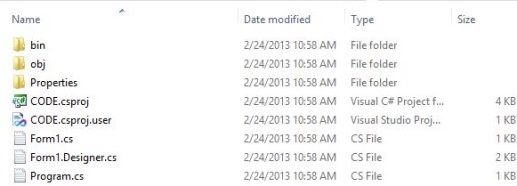
An example Visual C# project showing files and folders before zipping:
LEFT: Files in the CODE Solution folder RIGHT: Files in the CODE Project sub-folder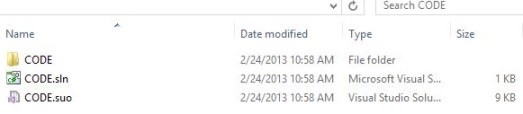
Submitting a Web Project (CIS 270)
1. Save your Web Project in the SPECIFIED FOLDER
Make sure ALL relevant files are in the specified
assignment folder before submitting.
Web projects should include all .html, .css and .js files
as well as any .jpg, .gif and .png image files.
2. Hand in Your Assignment
a. Locate your assignment folder
b. Zip the folder
- right click on the folder
- choose "Send to Compressed (zipped) folder"
c. Submit the .zip file via D2L DropBox!
Submitting an Assembly Project (CIS 253)
1. Save your Assembly Project in the SPECIFIED FOLDER
Make sure ALL relevant files are in the specified
assignment folder before submitting.
Assembly projects include all files generated by the
EMU8086 compile command plus original source.
There are six EMU files:
.asm .com .~asm .debug .list .symbol
2. Hand in Your Assignment
a. Locate your assignment folder
b. Zip the folder
- right click on the folder
- choose "Send to Compressed (zipped) folder"
c. Submit the .zip file via D2L DropBox!